
The modern world of high-paced digital design requires efficiency and consistency. Designers and content developers should be able to create things that can be used in various projects without losing their quality or style. This process is simplified by template-ready components, that allow quick deployment of social media campaigns, branding kits and multi-platform content. Online tools enable designers to access resources on-demand, work in unison, and have a consistent visual brand across campaigns. CapCut is a web-based tool that equips creators with AI-assisted design features and cross-platform capabilities that save time and focus on the ability to produce professional visuals with high fidelity and visual cohesion.
Table of Contents
The importance of Template-Ready Asset Creation in Rapid Design Studios
Reusable units are time-saving and ensure brand consistency in different projects. The modular nature of social media visuals, marketing kits, and content libraries can include the ability to drag, drop, or tailor an asset to the requirements. CapCut facilitates these processes by providing cloud-based workspace that can be accessed using any device.
This cross-platform feature enables creators to begin working on a project in one platform and proceed without any trouble in the other. It can be done in rapid iteration without compromising quality. The designers can preserve the style consistency when restructuring images across the platform. The possibility to rapidly change elements, background, or characters makes campaigns always fresh and relevant, which is paramount in a highly competitive environment.
How Nano Banana Pro Ensures Consistent, Editable Asset Outputs
Nano Banana Pro within CapCut provides advanced AI-powered generation for template-ready assets. Its main asset is the continuity of character identity, which makes sure that the subjects have recognizable features in various outputs. The consistency is essential to designers who design series-based templates, comic panels or product mockups. Prompt editing in natural language allows designers to create modules without technical limitations.
It is possible to refine or modify assets to particular visual requirements by just typing instructions. It is a non-destructive method that can be repeated many times and still maintains the integrity of the original design. Stable outputs minimize the repetitive editing requirements and the designers can concentrate in creative experimentation instead of having to repeat the alignment checks.
Optimizing Asset Compatibility with CapCut Tools
CapCut also has a powerful editing toolkit to polish AI-generated work. Cropping, masking, and color adjustment tools can be used to make sure that designs are appropriately sized to fit platform aspect ratios and template expectations. In-built editing features enable the ability to resize exactly to Instagram reels, YouTube thumbnails, or TikTok overlays.
The platform also helps with easy manipulation of lighting, shadows, and color palettes. Designers may also optimize generated resources without exiting the web interface, enhancing workflow. The integrity of the resolution can be easily maintained as CapCut supports high-fidelity 4K upscaling, meaning that images will be clearer when converted to different templates. Such abilities are useful in averting deterioration of quality and preservation of brand professionalism in all the outputs.
Precise Prompting to Construct Multi-Use Graphic Components
Good prompts ensure the AI generates icons, banners, backgrounds, or product cutouts that are multi-use. Descriptions allow better accuracy and align assets with design objectives. Images can be stored as reference and ensure stylistic consistency in several outputs. The 4K upscaling is high-fidelity to assure that assets are ready to be used commercially immediately or be later incorporated into other video projects. Different versions can be created out of one prompt, which minimizes repetitive work and offers more creative options to designers. The responsiveness of the platform enables real-time refinement, which is a rapid, iterative method of creating different graphic elements.
Steps to Create Template-Ready Assets Easily with Nano Banana Pro Quality
Step 1: Open the AI Design Workspace for Asset Creation
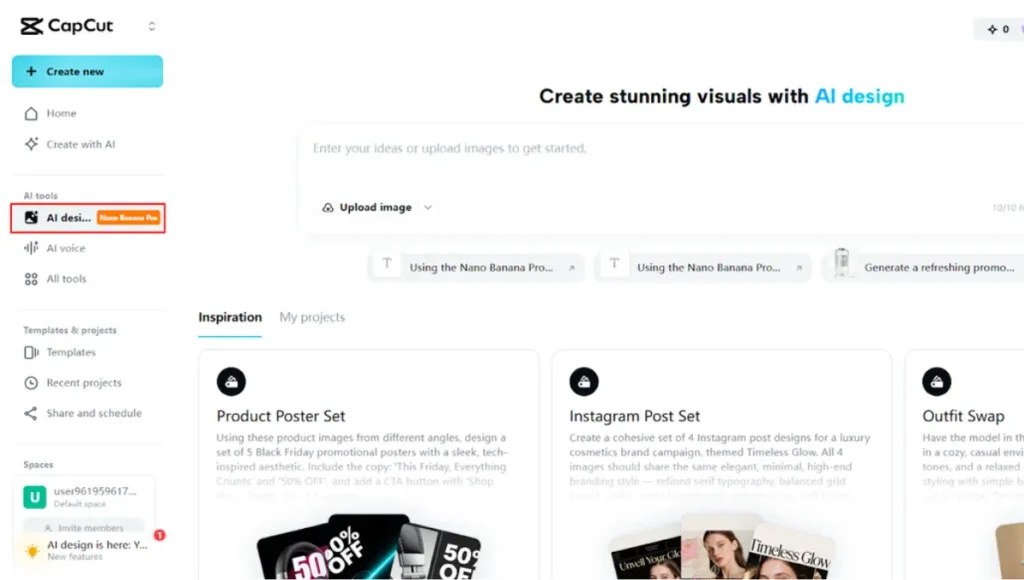
Start by visiting the CapCut and completing the signup process. After logging in, move to the “AI design” tab located under the AI tools menu on the left vertical side. This is where Nano Banana Pro’s advanced features become available for building clean, reusable, and template-ready assets with consistent quality.
Step 2: Define Asset Style and Upload Visual Reference
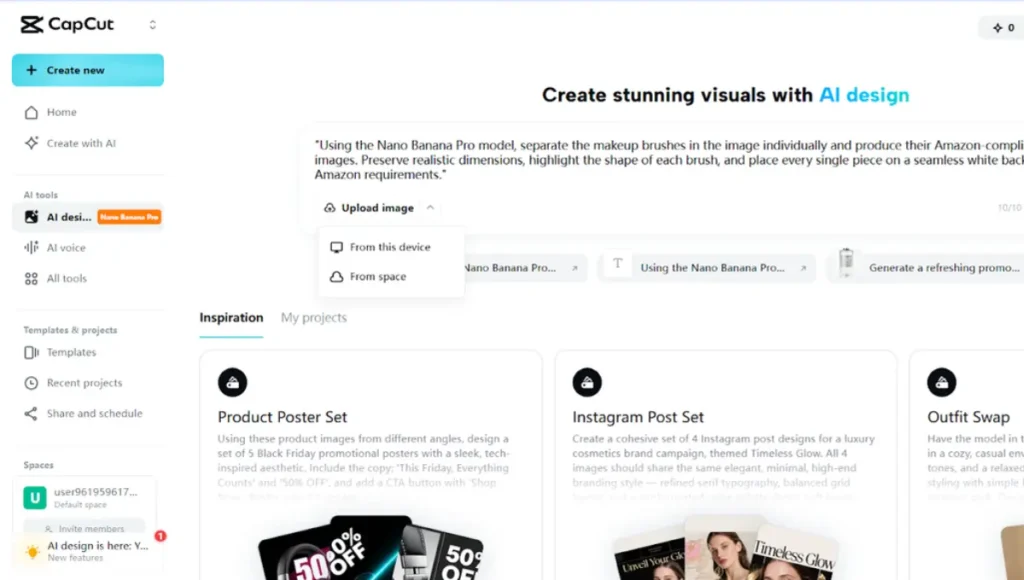
Enter a clear and specific design prompt in the text box based on the type of asset you need. For consistent layouts, shapes, or branding elements, upload a reference image to guide the final output. The image can come from your device or cloud space. After finalizing the input, click “Send” to generate your template-ready asset using Nano Banana Pro.
Step 3: Refine, Export, and Reuse with Precision
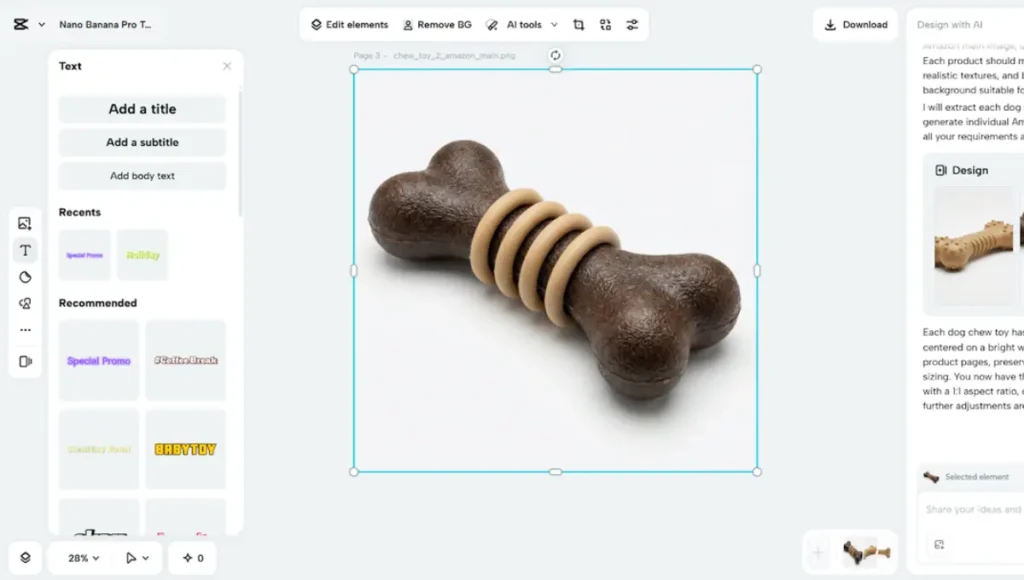
Once the asset appears, adjust it using the built-in editing tools such as text, stickers, shapes, and elements. Additional options allow you to paint, upscale, or expand the design through the AI tools from the top menu.
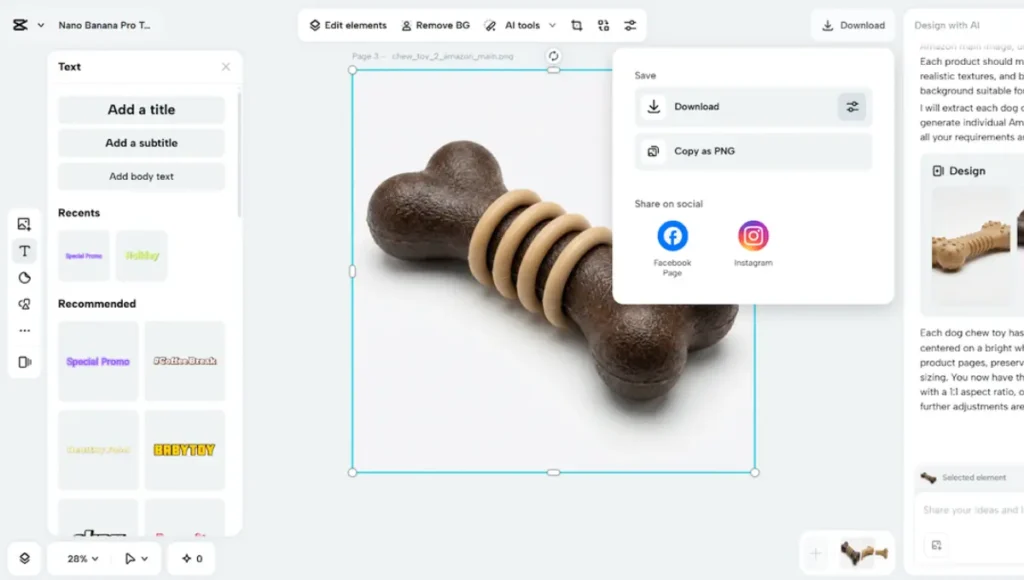
When satisfied, click the “Download” tab present in the top right corner to save your asset in high quality. You can also copy the design as PNG and reuse it across multiple templates.
Making AI-Created Multi-Platform Templates
Exported assets have to be platform specific and yet understandable. CapCut enables resizing and cropping Instagram reels, YouTube kits, Tik Tok overlays, etc. The resolution controls and 4K upscaling maintain sharpness and avoid pixelation. Even when assets have been edited or their format changed multiple times, they maintain their detail and visual representation. This consistency is important in developing template libraries to be used in campaigns. Web designers can be confident that AI generated items will be professional, polished and can be used in other formats without additional manual adjustments.
Visual Cohesion of Template Libraries
Harmony between the visuals is essential in branding and narration. CapCut assists in matching color palette, alignment of typography and maintenance of character identity. Templates may contain repeated characters or features and still have a coherent style. This allows templates (series) or campaign assets to be visually aligned across projects. Designers can easily replace single parts without affecting the overall design. Cohesive libraries are time-saving and perceived as more professional social media and marketing content.
Converting Generated Elements into Flexible Design Systems
AI-created assets may be stacked, stencilled, repainted, and edited to create flexible design blocks. Reusable elements make it easy to use and modify between templates. The CapCut editing interface is easy to manipulate and it preserves the original quality of the AI output. Designers are able to build visual systems in which the components are modular, reusable, and flexible. This allows less re-creation and enhances the speed of production. Even complex workflows, like creating multi-scene storyboards or integrating designs into videos with an AI video maker, benefit from the flexibility of well-organized design systems.
Conclusion
Nothing has been like template-ready asset creation faster and more consistent. CapCut, paired with Nano Banana Pro, empowers designers to generate high-quality visuals efficiently. The tools to create reusable, multi-platform assets are provided by consistent character identity, natural-language editing, and 4K upscaling. Streamlined creative processes are supported by cross-platform accessibility, refined editing tools, and modular design. It allows designers to create unified and professional content and minimize repetitive work and manual corrections. CapCut converts AI-generated results into customizable and trustworthy templates, which are suitable in social media, marketing, and multimedia projects of any size.
Also Read: 5 Ways AI Voicebots Reduce Workload | Call Center Automation Solutions